

Almost every contact page on the internet has a clickable phone number. They’ve been there for decades. Tap one on your phone and it rings. Click the same link on your computer and, most of the time, nothing happens — or something strange does.
Here’s one you can try right now, on whatever you’re reading this with: +1 (415) 555-0123. It’s a reserved fictional number, so it’s safe to click and nothing bad can happen. What does happen depends entirely on your device — and that difference is the whole story.
Where the click actually goes
A phone number link is just a web link with tel: at the front instead of https:. When you click it, your browser doesn’t try to make the call itself. Browsers show pages; they don’t have microphones queued up and dial tones ready. Instead, the browser hands the number to your operating system and says: someone wants to call this.
The operating system then looks in a particular place. Think of it as a slot labelled “phone app” — the one app on this device that’s registered to handle phone calls. Whatever sits in that slot gets the number. If the slot is empty, the number has nowhere to go.
That one slot explains everything that follows.
Why it always works on your phone
Your phone has exactly one thing that makes calls: the dialer. It’s built in, it can’t be removed, and it’s always in the slot. So when you tap a number, the phone never has to ask what you meant. The number goes straight to the dialer, and it rings.
That’s why phone links feel so natural on a phone that you’ve probably never thought about them. There was never a question to answer.
What your computer does with the same click
Your computer is a different animal. It can run a hundred apps that make sound, but it doesn’t ship with an obvious “thing that makes phone calls”. So the slot is a genuine question — and each operating system answers it differently.
On a Mac, Apple pre-fills the slot with FaceTime. Click a number and FaceTime opens and offers to place the call through your iPhone — which only works if you have an iPhone, nearby, signed into the same account, with that feature set up. If you’re sitting at a desk trying to ring a supplier, this is rarely what you wanted.
On Windows, the slot starts empty. You get the “How do you want to open this?” box, with a list of apps that is usually empty too, or that points you at the app store.
On Linux, no app claims phone links out of the box. The click does nothing. Not an error, not a dialog — nothing at all.
The important thing to notice: the link was never broken. The website did its job, the browser did its job, the operating system knocked on the door of the phone app. There was just nobody home.
A phone
- You tap
+1 (415) 555-0123 - In the slotThe dialer — the phone's one and only calling app
- SoIt rings.
A Mac
- You click
+1 (415) 555-0123 - In the slotFaceTime — Apple put it there
- SoFaceTime opens and offers to call through your iPhone — if you have one, nearby, with that set up.
Rarely what someone sitting at a desk actually wanted.
Windows
- You click
+1 (415) 555-0123 - In the slotempty
- So"How do you want to open this?" — with a list that's usually empty.
Linux
- You click
+1 (415) 555-0123 - In the slotempty
- SoNothing. Nothing at all.
Mac or Linux with WaveKat Voice
- You click
+1 (415) 555-0123 - In the slotWaveKat Voice — you put it there, with one switch
- SoThe app comes up with the number already typed in. You press Call.
How WaveKat Voice fills the slot
WaveKat Voice is a phone app for Mac and Linux — it places and receives real calls over your phone provider, and records and transcribes every one. And it can be the thing in the slot.
You flip one switch: Phone links, in Settings → General. It’s off until you turn it on, deliberately — taking over phone links for your whole computer should be your choice, not something an app grabs on install. Once it’s on, clicking a number on any web page brings up WaveKat Voice with the number already typed into the call box. You look at it, and you press Call.
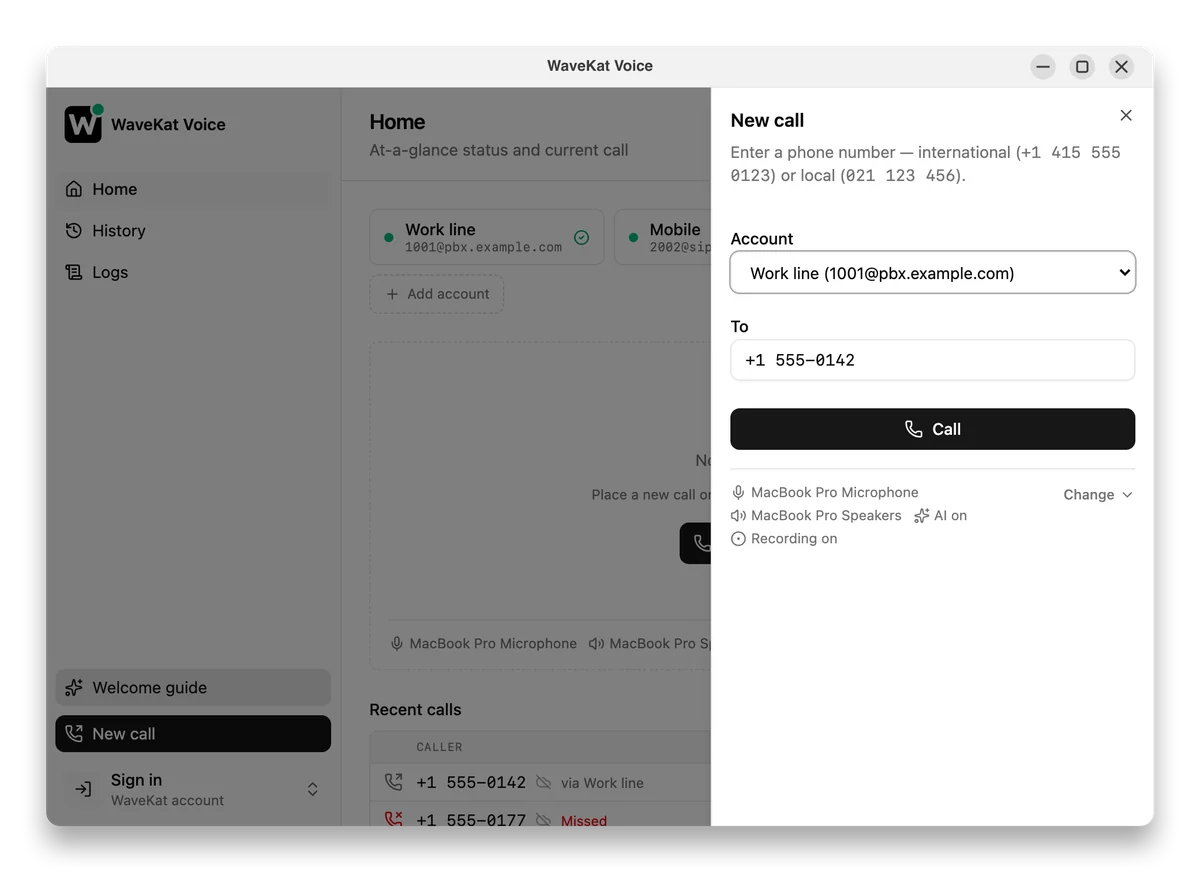
That’s the entire feature. No copying the number out of the page, no retyping it with the country code in the wrong place. It shipped in version 0.0.43, and there’s a shorter announcement of it in Click-to-Call: Dial Phone Links From Any Website.
Can a web page make my computer phone someone?
The question everyone asks next — and the right question to ask. No, it can’t.
A link can only request a call. By default, WaveKat Voice fills in the number and then waits for a human to press Call. Nothing dials until you do.
There is an optional “dial immediately” setting for people who trust their clicks and want one step fewer. It’s off by default. And even switched on, it refuses to act if you’re already on a call, or if it isn’t obvious which line the call should go out from — it fills the number in and waits, exactly like the default. The window always comes to the front, too, so nothing can ever dial somewhere you can’t see.
The slot is powerful, which is why the app in it should be cautious.
Frequently asked questions
Why does clicking a phone number do nothing on my computer?
Because no app on your computer has claimed phone links. The browser passes the number to the operating system, which looks for a registered phone app — and on Windows and Linux there usually isn’t one, so the click goes nowhere.
Can a website make my computer place a call?
No. A phone link can only request a call, and by default WaveKat Voice just fills in the number and waits for you to press Call. Even the optional dial-immediately setting refuses to act if you’re already on a call or if the outgoing line is ambiguous.
Why does clicking a phone number open FaceTime on my Mac?
Apple registers FaceTime as the Mac’s phone-link handler out of the box. FaceTime then offers to relay the call through a nearby iPhone, which only works if you own one and have the handoff feature set up. Installing another calling app, such as WaveKat Voice, lets you hand phone links to it instead.
How do I make phone links open in WaveKat Voice?
Turn on the Phone links switch in Settings → General — it’s off by default. After that, clicking a number on any web page opens WaveKat Voice with the number already typed in, ready to dial. It works on Mac and Linux and shipped in version 0.0.43.
Try that number again
Phone links have been quietly waiting on every contact page for decades; all your computer ever lacked was somebody home to answer them. If you’d like your clicks to ring, download WaveKat Voice for Mac or Linux, flip the one switch, and try the number at the top of this page again.